Ragdoll MMA Controls (November 2026)
Independent guide to the Roblox game by MattValidd · checked 3 Nov 2026.
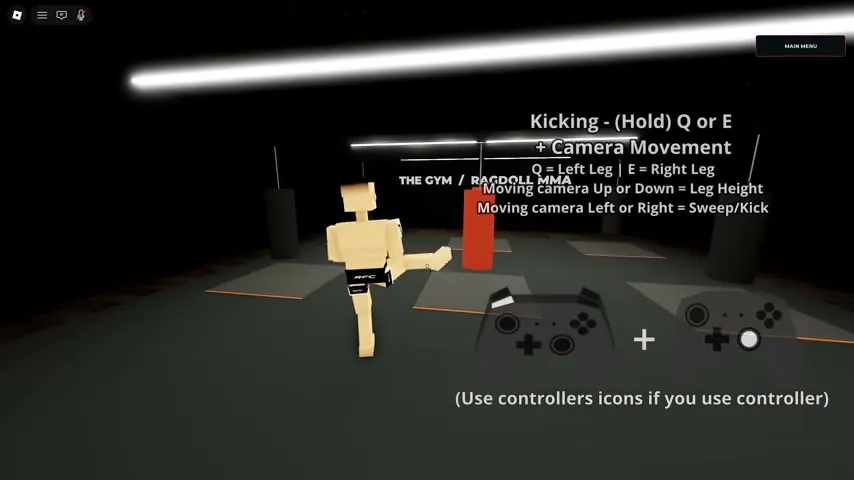
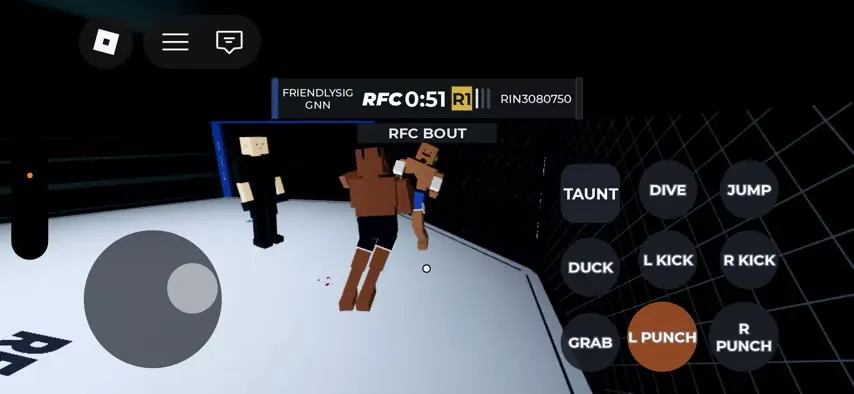
The PC labels below come from Ratmma3’s tutorials. Tony’s independent mobile footage confirms the punch, kick, grab and dive actions with touch buttons. Open Controls from the main menu before your first fight — that sentence is in the game’s own description. The grappling sequence is explained in the grappling guide.
| Action | PC | Mobile | Status |
|---|---|---|---|
| Punch | Hold LMB or RMB + camera | L PUNCH / R PUNCH | Action: 2 sources; PC key: 1 source |
| Kick | Hold Q or E + camera | L KICK / R KICK | Action: 2 sources; PC key: 1 source |
| Grab | G (toggle) | GRAB | Action: 2 sources; PC key: 1 source |
| Dive | X (directional) | DIVE | Action: 2 sources; PC key: 1 source |
| Crawl | WASD while down | Stick (seen, not labeled) | 1 source |
| Camera | Mouse / roll | Right touch area | 1 source |
Keyboard
Punching is hold-to-strike. The striking guide writes “Punching - (Hold) Left or Right Click + Camera Movement”. Kicking uses the same idea: “Q = Left Leg | E = Right Leg”, with camera height and sweep called out in the same frame. Grab is a toggle, not a hold. The grappling guide writes “Toggle Grab - G”, then “Punch/Throw (During Grab) - Q & E” and “Aiming/Readjust - (Hold) Left or Right Click”. Dive is “Diving - X (Directional)”. On the ground, “Crawling - WASD”.
Limb breaks are described in that same grappling video as a camera-down or camera-side adjustment while you tap toward an arm. The game description also names bone breaks, so the move exists, but the exact tap order is a single video.
| Action | PC | Mobile | Status |
|---|---|---|---|
| Jump | — | JUMP | Mobile: 1 source. PC label absent |
| Duck | — | DUCK | Mobile: 1 source. PC label absent |
| Get up | — | GET UP | Mobile: 1 source. PC label absent |
| Taunt | — | TAUNT | Mobile: 1 source. PC label absent |
| Action | Controller | Status |
|---|---|---|
| Punch / kick | — | Support: official description · 1 source; button mapping: — |
| Grab / dive | — | Support: official description · 1 source; button mapping: — |
Controller and the Controls menu
I am not copying a block key from other write-ups. One popular controls article says Space blocks and Q/E weave; its own homepage says Space jumps. The videos above show Q/E as kicks and G as grab. Those three stories cannot all be true, so this table follows the on-screen labels only.
Controller icons appear in the striking tutorial, and the description promises controller support. Until a public frame prints the face buttons, the controller column stays empty on purpose. The main menu recording shows Settings and Learn. It does not show a remapping panel.
If a grab fails, the public tip is only the toggle itself: press G when your hands can reach. Distance and stamina rules are not printed. For a first match, see how to play; device evidence is on platforms. More of the grip, throw and ground sequence is on the grappling page, and the move names are on moves.
FAQ
How do I punch in Ragdoll MMA?
Hold the left or right mouse button and move the camera. The striking tutorial prints that line on screen. Mobile uses L PUNCH and R PUNCH.
How do I kick?
Hold Q for the left leg or E for the right leg. Camera up and down changes leg height. Camera left and right makes a sweep. Mobile uses L KICK and R KICK.
How do I grab?
Press G to toggle grab. During a grab, Q and E punch or throw, and holding a mouse button readjusts the grip. Mobile has a GRAB button.
Can I rebind keys?
The main menu has Settings. No public recording shows the rebind screen, so this page does not invent a key-change path.
Does a controller work?
The game description says PC and controller support. A tutorial tells controller users that icons switch. Specific controller buttons are not printed, so the mapping remains blank.
Sources
- Roblox game page description — checked 2026-11-03
- Ratmma3 striking tutorial — checked 2026-11-03
- Ratmma3 grappling tutorial — checked 2026-11-03
- Tony mobile match — checked 2026-11-03