Ragdoll MMA Moves List
Independent guide to the Roblox game by MattValidd · checked 3 Nov 2026.
Names in the first column are plain-language labels, not a move list from a pause menu. The description’s own words are boxing, roundhouse kicks, wrestling, ground-and-pound, knockouts, bone breaks and X-ray replays. Inputs come from tutorial captions. Keys that were never printed stay as a dash. Timing and counters for grabs are written out on grappling; the raw keys are on controls.
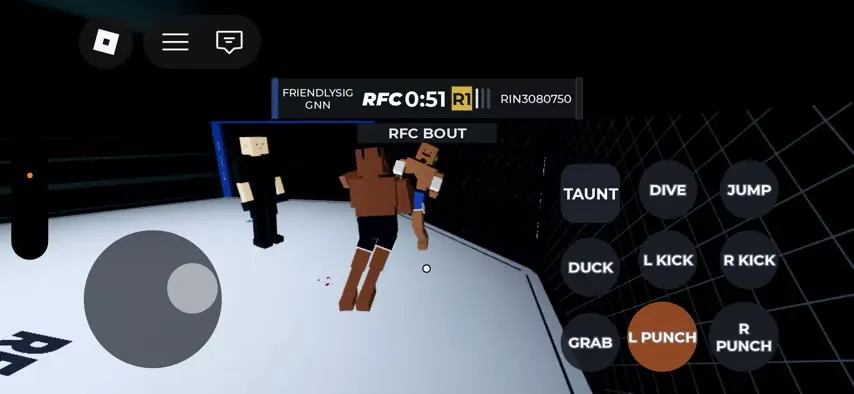
| Left Punch | Left Mouse Button (hold) | L PUNCH | — | Strike | Left-hand punch. The tutorial groups both punches under 'Punching - (Hold) Left or Right Click + Camera Movement'. | — | Action: 2 sources; PC key: 1 source |
| Right Punch | Right Mouse Button (hold) | R PUNCH | — | Strike | Right-hand punch; same hold-to-punch model as the left punch. | — | Action: 2 sources; PC key: 1 source |
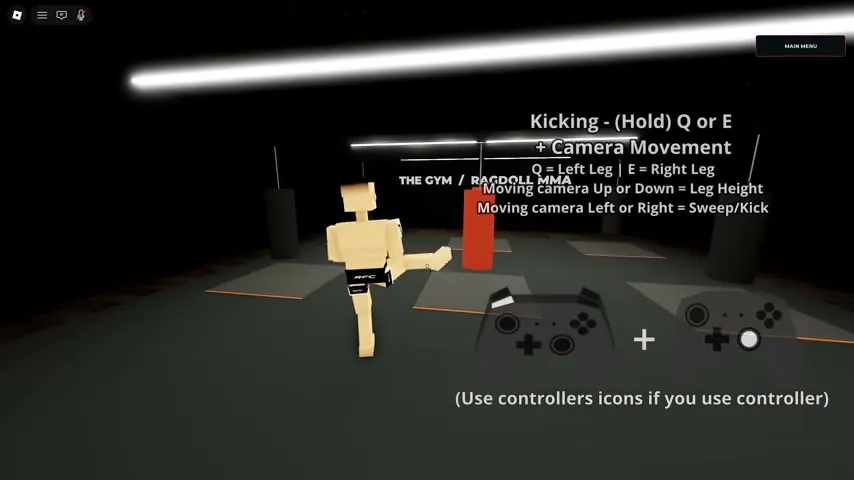
| Left Kick | Q (hold) + camera up/down for height, left/right for sweep | L KICK | — | Strike | Hold Q to kick with the left leg. Camera up/down sets leg height; camera left/right produces a sweep/kick. | — | Action: 2 sources; PC key: 1 source |
| Right Kick | E (hold) + camera up/down for height, left/right for sweep | R KICK | — | Strike | Hold E to kick with the right leg; same camera height/sweep modifiers as the left kick. | — | Action: 2 sources; PC key: 1 source |
| Grab / Clinch | G (toggle) | GRAB | — | Grapple | Toggles a grab/clinch so you can hold the opponent and work from the clinch. The tutorial labels it 'Toggle Grab - G'. | — | Action: 2 sources; PC key: 1 source |
| Punch / Throw During Grab | Q or E while grabbing | — | — | Grapple strike | While holding a grab, Q/E throw punches; the tutorial separately labels a 'Punch Modifier (During Grab)' on the same keys. | — | PC key sequence: 1 tutorial source |
| Dive | X (directional) | DIVE | — | Movement / grapple entry | Directional dive that can close distance or enter a grappling exchange. | — | Action: 2 sources; PC key: 1 source |
| Duck | — | DUCK | — | Defence | Defensive duck button visible in the mobile touch layout. PC binding not shown in the sources reviewed. | — | Mobile action: 1 source; PC: — |
| Jump | — | JUMP | — | Movement | Jump button visible in the mobile touch layout. PC binding not shown in the sources reviewed; do not assume Space without evidence. | — | Mobile action: 1 source; PC: — |
| Get Up | — | GET UP | — | Recovery | Stand up after being knocked down; visible as a touch button. PC binding not shown. | — | Mobile action: 1 source; PC: — |
| Taunt | — | TAUNT | — | Cosmetic | Taunt button visible in the mobile touch layout. PC binding not shown. | — | Mobile action: 1 source; PC: — |
| Ground and Pound | — | — | — | Grapple strike | Striking from top position on the ground; shown repeatedly in the grappling guide and named in the official description ('ground-and-pound'). | — | Action: developer + 1 tutorial source; input: — |
| Takedown / Slam | — | — | — | Grapple | Takedown and slam shown in the grappling guide ('Leg takedown into slam', jumping slam). Exact key sequence is not printed on screen. | — | 1 tutorial source; input: — |
| Limb Break | Grab, then move camera down/side while spamming punch toward the arm (per tutorial text) | — | — | Submission / injury | Twist or crank a limb while grappling; the tutorial says moving the camera down/side and punching toward the arm can break it. Official description lists bone breaks. | — | Action: developer + 1 tutorial source; key sequence: 1 source |
FAQ
What is the best move?
No public win-rate or damage table exists. The description highlights punches, roundhouse kicks, wrestling, ground-and-pound, knockouts and X-ray replays. That is a feature list, not a ranking.
Are jab, cross and hook official names?
No. Those are ordinary boxing words. The tutorials say left click, right click, Q and E.
What is the X-ray finish?
The description names slow-motion X-ray finish replays after knockouts and bone breaks. Frame data for how you trigger one is not printed.
Sources
- Game description — checked 2026-11-03
- Striking tutorial — checked 2026-11-03
- Grappling tutorial — checked 2026-11-03